
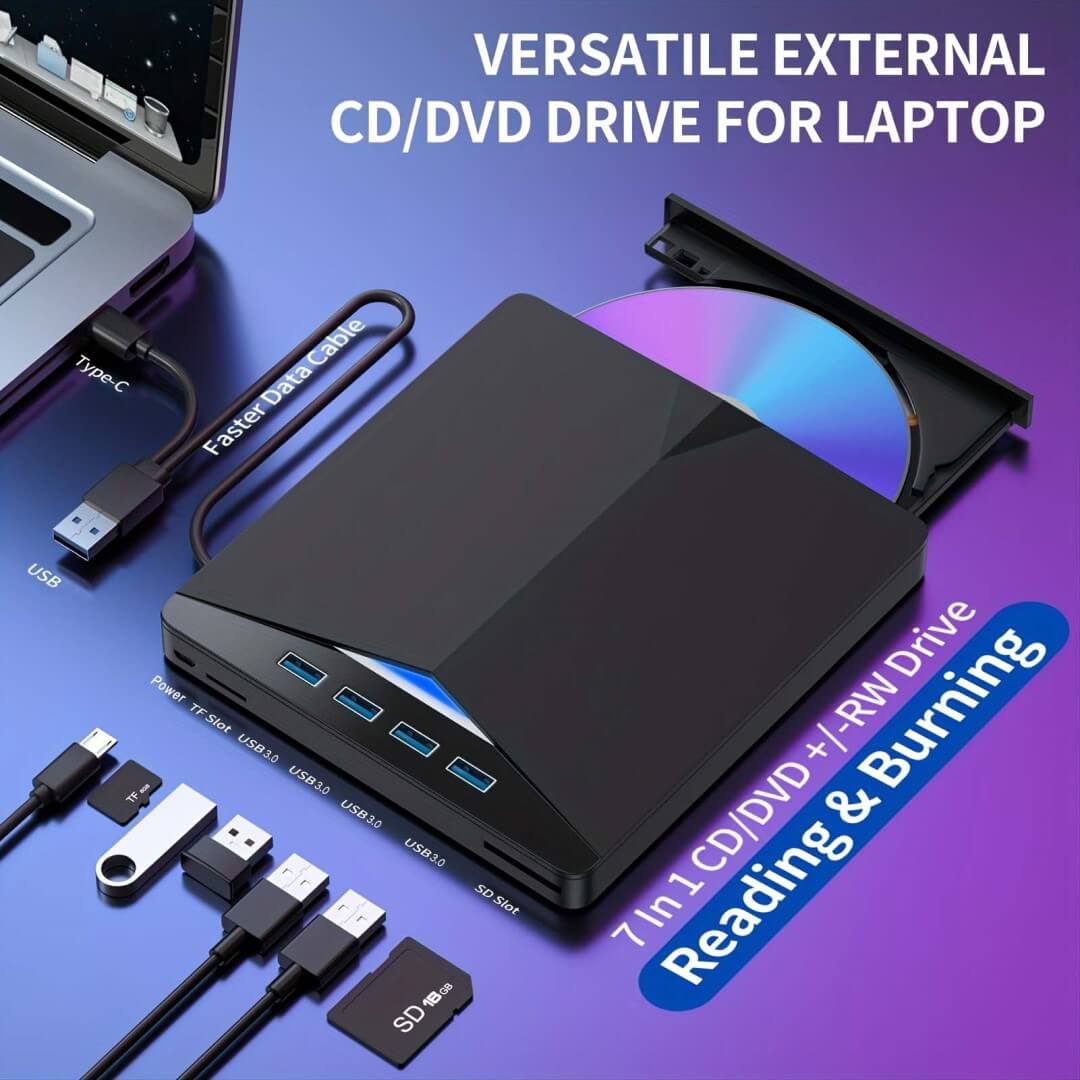


Lettore e masterizzatore portatile 7 in 1 USB 3.0/SD/TF/DVD/CD/VCD

- 🏭 Ships from Illinois, USA
- 🚛 Fast Delivery (3-8 Days)
- 🎉 BUY 2 GET EXTRA 10% OFF 🎉
- 🎉 BUY 3 GET EXTRA 15% OFF 🎉
- 🎉 BUY 4+ GET EXTRA 20% OFF 🎉
🔹 Proteggi i tuoi dati importanti con un archivio affidabile
Lo sapevi? Avvocati, medici, enti governativi e aziende si affidano ancora a CD e DVD per l'archiviazione sicura e a lungo termine dei dati. A differenza delle unità USB o dell'archiviazione cloud, i dischi ottici proteggono i file da minacce informatiche, cancellazioni accidentali e dipendenza da Internet , garantendo che i file di lavoro critici, i documenti legali e le cartelle cliniche rimangano intatti per decenni.
📀 Conserva i tuoi ricordi e i file essenziali per sempre
Masterizza e archivia facilmente video di famiglia, film classici, musica preferita e progetti di lavoro su CD e DVD. Non preoccuparti più di perdere ricordi preziosi o documenti importanti a causa di guasti del disco rigido o interruzioni del servizio cloud.
⚡ Veloce, pratico e plug & play
Non sono necessari software o driver aggiuntivi! Basta collegarlo al tuo laptop o desktop e iniziare subito a guardare, masterizzare o eseguire il backup dei tuoi file. Compatibile con Windows, Mac e Linux per la massima facilità d'uso.
🔒 Archiviazione sicura, senza virus e a prova di manomissione
A differenza dei dischi rigidi esterni che possono essere danneggiati, hackerati o formattati accidentalmente , CD e DVD offrono una protezione di sola lettura , perfetta per studi legali, ospedali, archivi aziendali e per la sicurezza dei dati personali . Proteggi i tuoi file sensibili dalle minacce informatiche!
🚀 Prestazioni ad alta velocità per un accesso rapido
Grazie all'avanzata tecnologia USB 3.0 , puoi raggiungere velocità di trasferimento dati fino a 5 Gbps , rendendo la riproduzione di film, il backup dei dati e la masterizzazione di file più rapidi e fluidi . Completamente compatibile anche con dispositivi USB 2.0 e 1.0 .
💼 Compatto, durevole e adatto ai viaggi
Progettata per i professionisti sempre in movimento , questa leggera unità DVD esterna è perfetta per presentazioni aziendali, archiviazione di documenti legali, backup di cartelle cliniche e intrattenimento mobile . A casa, in ufficio o sul campo, porta la tua libreria digitale ovunque!
🔗 Connessione stabile e affidabile
Dotato di un cavo dati di alta qualità da 20 cm con tecnologia a maglia di rame puro a bassa impedenza , che garantisce prestazioni fluide e ininterrotte ogni volta che lo utilizzi.
🛡️ Garanzia di autenticità e garanzia
Nota: questo prodotto è protetto dalla nostra tecnologia brevettata ed è venduto esclusivamente sul sito web ufficiale di STYLEDAB . Recentemente, sono apparse sul mercato numerose copie di bassa qualità. Prestate attenzione quando acquistate da altri venditori : non possiamo fornire assistenza post-vendita o rimborsi per prodotti contraffatti o imitazioni scadenti che potrebbero causare problemi di compatibilità o malfunzionamenti.
✅ Quando acquisti direttamente da STYLEDAB, ti garantiamo:
-
Prodotto autentico al 100% con garanzia completa
-
Rimborso completo entro 30 giorni senza domande se non sei soddisfatto
-
Supporto clienti affidabile per la risoluzione dei problemi e l'assistenza
Scegli lo store ufficiale STYLEDAB per un'esperienza senza pensieri e prestazioni garantite!
📦 Contenuto della confezione:
✅ 1 unità DVD esterna
✅ 1 cavo USB
✅ 1 x Manuale utente
📊 Specifiche:
- Velocità di lettura: DVD-ROM 8X, DVD-9 6X, DVD-RAM 4X, CD-RAM 24
- Velocità di scrittura: DVD-R 8X, DVD+RW 6X, DVD-RAM 4X, DVD-9 4X, CD-R 24X, CD-RW 24X
- Formati disco supportati: 8/12cm
- Dimensioni: 5,63 * 6,06 * 0,63 pollici
📌 Note importanti:
⚠️ TV, sistemi multimediali per auto e smartphone non supportano unità DVD esterne.
⚠️ Assicurati che sul tuo computer sia installato un lettore multimediale (consigliamo VLC Player ).
⚠️ Se l'unità DVD non funziona, controlla le impostazioni del codice regionale (Gestione dispositivi > DVD/CD-ROM > Proprietà > Regione).
✈️ Spedizione veloce e assicurata! Tutti gli ordini vengono spediti direttamente dal nostro magazzino in Illinois. Ogni ordine è dotato di un numero di tracciamento per consentirti di seguire il tuo pacco in ogni fase del percorso. Le soluzioni di stoccaggio di qualità valgono l'attesa! 😉
Part 1: How to Play Discs (DVDs, CDs, or VCDs)
(Watch movies or listen to music for free!)
- Step 1: Get the Free Player
Open your browser and type: www.videolan.org. Click the big orange button "Download VLC" and install it. (It is free and safe!) - Step 2: Insert Your Disc
Place your DVD, CD, or VCD into the drive. - Step 3: Open & Play
Find the "Orange Traffic Cone" icon on your desktop and open it.
Click "Media" (top left corner) -> "Open Disc" -> "Play".
Part 2: How to Save Photos/Files to a Disc (Windows)
(Back up your memories easily)
- Step 1: Insert a Blank Disc
Put a blank DVD or CD into the drive. - Step 2: Choose "USB" Mode
A clear window will pop up. Select "Like a USB flash drive".
(Note: This is the easiest way. If asked for a title, type the date, e.g., "2026 Photos".) - Step 3: Copy Your Photos
Open the folder with your photos. Select the photos you want, Right-click and choose "Copy". - Step 4: Paste to Disc
Open the DVD Drive folder. Right-click inside the empty space and choose "Paste". - Step 5: Finish
Wait for the files to copy. Once stopped, right-click the DVD drive icon and select "Eject" to save safely.
To United States:
STANDARD SHIPPING
- $3.99 USD, FREE on orders $60+ USD
- Estimated to be delivered 3-8 business days.
EXPRESS SHIPPING
- $7.99 USD, FREE on orders $100+ USD
- Estimated to be delivered 2-4 business days.
To Australia:
STANDARD SHIPPING
- $5.99 AUD, FREE on orders $70+ AUD
- Estimated to be delivered 7-15 business days.
EXPRESS SHIPPING
- $11.99 AUD, FREE on orders $150+ AUD
- Estimated to be delivered 3-8 business days.
To Canada:
STANDARD SHIPPING
- $5.99 CAD, FREE on orders $60+ CAD
- Estimated to be delivered 7-15 business days.
EXPRESS SHIPPING
- $10.99 CAD, FREE on orders $140+ CAD
- Estimated to be delivered 3-8 business days.
To United Kingdom:
STANDARD SHIPPING
- £2.99 GBP, FREE on orders £40+ GBP
- Estimated to be delivered 7-15 business days.
EXPRESS SHIPPING
- £5.99 GBP, FREE on orders £80+ GBP
- Estimated to be delivered 3-8 business days.
To Austria, Belgium, Croatia, Cyprus, Estonia, Finland, France, Germany, Greece, Ireland, Italy, Latvia, Lithuania, Netherlands, Portugal, Slovakia, Slovenia, Spain:
STANDARD SHIPPING
- €3.99 EUR, FREE on orders €40+ EUR
- Estimated to be delivered 7-15 business days.
EXPRESS SHIPPING
- €6.99 EUR, FREE on orders €90+ EUR
- Estimated to be delivered 3-8 business days.
RESI GRATUITI su tutti gli ordini!
Devono essere soddisfatte le seguenti condizioni:
- Abbiamo una politica di reso di 30 giorni, il che significa che hai 30 giorni di tempo dal ricevimento dell'articolo per richiedere un reso.
- Gli articoli devono essere integri, non indossati e nella confezione originale.
- Pagamenti sicuri
- Logistica sicura
- Assistenza clienti
- Tutela della privacy